 Aug 28, 2026 - 0
Minutes read
Aug 28, 2026 - 0
Minutes read
Microsoft Clipchamp: Complete Guide to Video Editing for Beginners
How to Use It for Easy Video Editing
Everything video, right here
Ever wanted to make a video but felt overwhelmed by complicated editing software? You're not alone. Many people give up before they even start, worried they'll waste hours learning tools that feel more like rocket science than storytelling. That frustration matters, because video is now one of the easiest ways to share ideas, memories, and messages—and everyone deserves a tool that makes it simple.

That's exactly where Microsoft Clipchamp comes in. In this guide, you'll learn what Clipchamp is, how to use it step by step, its best features, and how the free and premium versions compare. It's beginner-friendly, safe to use, and built right into Windows, so you can start editing with confidence today.
What Is Microsoft Clipchamp and What Is It Used For?
Microsoft Clipchamp is a free, browser-based video editor owned by Microsoft. It comes pre-installed on Windows 11 and can be downloaded on Windows 10, making it one of the most accessible video editing tools around. You can also use it online through a web browser, so you don't always need to install anything.
Clipchamp is designed for people who want quality results without a steep learning curve. It's popular with content creators, students, small business owners, and everyday users who need to edit videos quickly.
Here are some common uses for Microsoft Clipchamp:
- Social media videos for platforms like YouTube, TikTok, and Instagram
- Presentations and tutorials for work or school
- Family videos and personal memory reels
- Marketing content such as product demos and promo clips
- Screen recordings for how-to guides and training
Because it runs in the browser and syncs with your Microsoft account, Clipchamp is a handy choice for anyone who values convenience and simplicity.
How to Use Microsoft Clipchamp (Step-by-Step)
Getting started with Microsoft Clipchamp is refreshingly simple. Follow these steps to create your first video from scratch.
Step 1: Open Clipchamp and Sign In
Launch Clipchamp from your Windows Start menu, or head to the Clipchamp website. Sign in using your Microsoft, Google, or email account. If you're on Windows 11, it's likely already installed and ready to go.
Step 2: Create a New Project
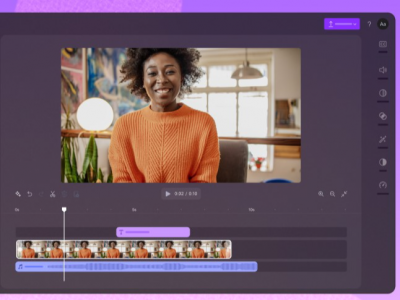
Click Create a new video to open the editing workspace. You'll see a timeline at the bottom, a preview window in the center, and a toolbar on the left. Don't feel intimidated—the layout is clean and easy to follow.
Step 3: Import Your Media
Click Import media to upload your video clips, photos, and audio files. You can drag files straight from your computer, or pull in content from your phone, OneDrive, or stock libraries.
Step 4: Add Clips to the Timeline
Drag your media onto the timeline to start building your video. Arrange clips in the order you want, and trim them by dragging the edges. This is where your story starts to take shape.
Step 5: Edit and Enhance
Now the fun begins. Use the toolbar to:
- Trim and split clips to remove unwanted sections
- Add text and titles to highlight key points
- Insert transitions for smooth scene changes
- Add music or voiceovers from the audio library
- Apply filters and effects to set the mood
Step 6: Preview Your Video
Hit the play button in the preview window to review your work. Watch for timing, audio levels, and any clips that need trimming. Make adjustments until it feels right.
Step 7: Export and Share
When you're happy with your video, click Export in the top-right corner. Choose your resolution, then download the file or share it directly to platforms like YouTube. That's it—your video is ready.
Best Microsoft Clipchamp Features for Video Editing
Microsoft Clipchamp packs plenty of useful tools into a simple interface. Here are the features that make it stand out.
Templates and Ready-Made Designs
Clipchamp offers dozens of templates for social posts, slideshows, and promos. These give you a professional starting point, so you don't have to build every video from scratch.
Text-to-Speech
Need a narrator but don't want to record your own voice? Clipchamp's text-to-speech feature turns written words into natural-sounding audio in multiple languages and voices.
Screen and Webcam Recorder
You can record your screen, your webcam, or both at once. This makes Clipchamp perfect for tutorials, presentations, and reaction videos without needing extra software.
Stock Library
Clipchamp includes a huge library of stock video, images, audio, and GIFs. Many are free, giving you plenty of material to enhance your projects.
Auto Captions
The auto-captions feature generates subtitles automatically. This boosts accessibility and helps your videos perform better on social media, where many people watch with the sound off.
Brand Kit
For business users, the Brand Kit lets you save your logos, colors, and fonts. This keeps your videos consistent and on-brand every time.
Microsoft Clipchamp Free vs Premium: What's the Difference?
Microsoft Clipchamp offers both a free plan and a premium (paid) plan. The free version is generous, but premium unlocks a few extras worth considering.
Feature | Free Plan | Premium Plan |
|---|---|---|
1080p video export | Yes | Yes |
Basic editing tools | Yes | Yes |
Templates | Yes | Yes |
Watermark | None | None |
Premium stock content | Limited | Full access |
Brand Kit | No | Yes |
Cloud backup | No | Yes |
Premium filters and effects | Limited | Full access |
The free plan is ideal for beginners, students, and casual creators. You get full 1080p exports with no watermark, which is rare among free editors.
The premium plan suits businesses and frequent creators who want access to the full stock library, Brand Kit, cloud backup, and premium effects. Choose premium if you edit videos regularly and want your content to look polished and consistent.
Start Creating with Microsoft Clipchamp Today
Microsoft Clipchamp proves that video editing doesn't have to be complicated or expensive. With its clean interface, helpful templates, and generous free plan, it's a fantastic choice for anyone who wants to create great videos without the stress.
The best way to learn is to jump in and start experimenting. Open Clipchamp, upload a few clips, and play around with the tools. Before long, you'll be trimming, adding text, and exporting videos like a pro. Ready to bring your ideas to life? Give Microsoft Clipchamp a try today.
Frequently Asked Questions
Is Microsoft Clipchamp free to use?
Yes, Microsoft Clipchamp is free to use. The free plan includes 1080p exports, basic editing tools, and templates with no watermark. You can upgrade to the premium plan later if you want extras like the full stock library, Brand Kit, and cloud backup.
Is Microsoft Clipchamp good for beginners?
Absolutely—Clipchamp is one of the most beginner-friendly video editors available. Its clean, drag-and-drop interface makes editing simple, even if you've never made a video before. Ready-made templates also help you get started quickly without any technical skills.
Can I use Microsoft Clipchamp on Windows 10 and 11?
Yes, Microsoft Clipchamp works on both Windows 10 and Windows 11. On Windows 11, it usually comes pre-installed, while Windows 10 users can download it from the Microsoft Store. You can also use it in a web browser on almost any device.
Does Microsoft Clipchamp add a watermark?
No, Microsoft Clipchamp does not add a watermark to your videos. This applies to both the free and premium plans, which is a big advantage over many other free editors. Your finished videos stay clean and professional.
Can Microsoft Clipchamp export videos in 1080p?
Yes, Microsoft Clipchamp lets you export videos in full 1080p HD, even on the free plan. This ensures your videos look sharp and professional on any platform. For most creators, 1080p is the perfect balance of quality and file size.
