 Jul 30, 2026 - 0
Minutes read
Jul 30, 2026 - 0
Minutes read
What Is an NVR? How It Works, Benefits & How to Choose One
Learn what an NVR is, how it works, and how it compares to DVR systems.
What Is an NVR? How It Works, Benefits & How to Choose One
An NVR (Network Video Recorder) is a device that records and stores video footage from IP cameras over a network. Unlike older analog systems, NVRs deliver high-definition video, remote access, and flexible camera placement—making them a popular choice for modern home and business security setups.
Choosing the wrong security system can leave gaps you won't notice until it's too late. If you've been looking into security cameras and keep seeing the term "NVR," you're not alone—it's one of the most searched terms in home and business security, and for good reason. Getting this decision right can mean the difference between a system that truly protects your space and one that falls short.
This guide breaks down exactly what an NVR is, how it works, how it compares to older DVR systems, and what to look for when buying one. By the end, you'll have everything you need to choose the right setup with confidence.
What Is an NVR (Network Video Recorder)?
A Network Video Recorder, or NVR, is a device that captures, stores, and manages video footage from IP (Internet Protocol) cameras connected over a network. The key word here is network—unlike older systems that relied on analog signals and coaxial cables, NVRs communicate digitally with cameras via a standard Ethernet or Wi-Fi connection.
NVRs are designed to work specifically with IP cameras. These cameras encode and process video data on their own before transmitting it to the NVR for storage and management. This means the recording quality is determined by the camera itself, which is why NVR systems typically deliver sharper, more detailed footage than their analog counterparts.
NVR systems are used in a wide range of settings, including:
- Residential homes — for monitoring entry points, driveways, and yards
- Small businesses — for loss prevention and employee safety
- Commercial properties — for large-scale surveillance across multiple zones
- Remote locations — thanks to wireless connectivity and remote access features
The flexibility and scalability of NVR systems make them a go-to choice for anyone building a modern security setup from scratch or upgrading an older system.
How Does an NVR Work? (Step-by-Step Explanation)
Understanding how an NVR works helps you make smarter decisions about setup, camera selection, and storage. Here's the process broken down step by step.
Step 1: IP cameras capture and encode video
Each IP camera in the system independently captures video footage and encodes it into a digital format—typically H.264 or H.265. H.265 (also known as HEVC) is the more advanced of the two, compressing video files more efficiently without sacrificing image quality. This matters because efficient compression means longer storage times and less strain on your network.
Step 2: Video data is transmitted over the network
Once encoded, the footage is sent from the camera to the NVR via a local network. This is usually done through:
- PoE (Power over Ethernet) — a single cable that carries both power and data to the camera, simplifying installation significantly
- Wi-Fi — useful for cameras in locations where running cables isn't practical
PoE connections are generally preferred for their reliability and reduced interference compared to wireless alternatives.
Step 3: The NVR receives and stores the footage
The NVR receives the incoming data stream and writes it to an internal storage drive—typically a hard disk drive (HDD) or solid-state drive (SSD). Most NVRs support multiple drive bays, allowing you to expand storage capacity as your needs grow.
Step 4: You access and review the footage
Through the NVR's interface—either a connected monitor or a dedicated app—you can view live feeds, review recorded footage, and configure settings like motion detection zones, recording schedules, and alert notifications. Many NVR systems also offer remote access, so you can check in on your cameras from a smartphone or computer, anywhere in the world.
NVR vs. DVR: What's the Difference?
The NVR vs. DVR debate comes up often, and the distinction is more significant than most people realize.
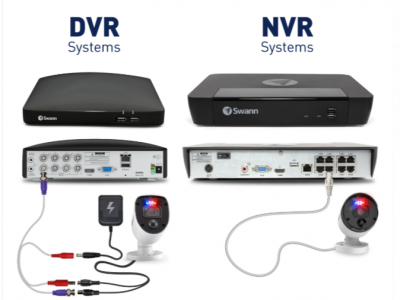
A DVR (Digital Video Recorder) works with analog cameras. The cameras themselves don't process video—they simply capture a raw analog signal and send it to the DVR via coaxial cable, where it gets encoded and stored. This creates a dependency on the DVR's processing power and limits where cameras can be placed (coaxial cables have strict distance limitations).
An NVR, by contrast, works with IP cameras that handle their own encoding. This results in several practical advantages:
|
Feature |
NVR |
DVR |
|
Camera type |
IP cameras |
Analog cameras |
|
Cable type |
Ethernet / Wi-Fi |
Coaxial |
|
Video quality |
High-definition (up to 4K+) |
Lower resolution |
|
Installation flexibility |
High |
Limited |
|
Remote access |
Standard |
Often limited |
|
Scalability |
Easy |
Difficult |
Choose an NVR if you're building a new system and want high-definition footage, easy scalability, and remote access. Choose a DVR if you're working with an existing analog camera setup and want to minimize costs.
For most new installations today, NVR is the recommended choice.
Key Features to Look for When Choosing an NVR
Not all NVRs are created equal. Here's what to evaluate before making a purchase.
How many camera channels does the NVR support?
NVRs are sold by channel count—4-channel, 8-channel, 16-channel, and beyond. A channel represents one camera connection. Always buy slightly above your current needs. If you have five cameras today, an 8-channel NVR gives you room to expand without buying a new unit later.
Does it support PoE ports?
PoE (Power over Ethernet) support is a major convenience feature. A PoE NVR can power cameras directly through the Ethernet cable, eliminating the need for separate power adapters at each camera location. Look for NVR units that include built-in PoE ports—this simplifies installation and reduces clutter significantly.
What resolution does the NVR support?
Your NVR must be compatible with the resolution of your cameras. Common resolutions for NVR systems include:
- 1080p (Full HD) — suitable for most home and small business setups
- 4MP and 5MP — a solid middle ground for sharper detail
- 4K (8MP) — ideal for large properties or areas requiring maximum detail, like parking lots or entry gates
Check that the NVR can handle the combined bandwidth of all cameras running simultaneously at full resolution.
How much storage does it offer?
Storage capacity determines how many days of footage you can retain before the system begins overwriting older recordings. The right amount depends on:
- Number of cameras — more cameras generate more data
- Recording resolution — higher resolution uses more storage per hour
- Recording schedule — continuous recording consumes far more space than motion-triggered recording
As a general rule, a single 1080p camera recording continuously uses approximately 15–20 GB per day. An 8-camera system at 1080p would need around 1–2 TB for a week of continuous footage. Most NVRs support drives ranging from 1 TB to 8 TB or more.
Does it offer remote viewing and smart alerts?
Modern NVRs connect to mobile apps that allow you to monitor live feeds, receive motion alerts, and review recorded footage from anywhere. Look for systems with:
- Mobile app compatibility (iOS and Android)
- Push notifications for motion or sound detection
- Two-way audio if you want the ability to communicate through cameras
Some NVRs also support AI-powered detection features that can distinguish between people, vehicles, and animals—reducing false alerts significantly.
Is it compatible with your existing or planned cameras?
NVR systems are generally designed to work with cameras from the same manufacturer. While ONVIF (Open Network Video Interface Forum) is an industry standard that promotes cross-brand compatibility, not all features may function when mixing brands. Sticking to one ecosystem—especially for first-time buyers—reduces setup headaches considerably.
Making the Right Call for Your Security Setup
An NVR system represents a meaningful step up from older analog technology. High-definition video, flexible camera placement, remote access, and smart detection features make NVR systems the standard for modern surveillance—whether you're protecting a family home or a commercial property.
The best NVR for your needs comes down to four core factors: the number of cameras you need to support, the resolution you want, the storage capacity required, and whether the system integrates with a reliable mobile app. Get those four right, and everything else falls into place.
If you're comparing specific models, prioritize systems with built-in PoE ports, at least one empty hard drive bay for future expansion, and a manufacturer with solid app support. A small investment in the right setup today avoids a much larger one down the road.
Frequently Asked Questions
What is an NVR used for?
An NVR is used to record, store, and manage video footage from IP security cameras. It's most commonly used in home and business security systems to monitor entry points, parking areas, warehouses, retail spaces, and other locations that require continuous or motion-triggered surveillance.
Do NVR cameras work without the internet?
Yes—NVR cameras record and store footage locally without requiring an internet connection. The NVR and cameras communicate over a local network (LAN), so recording continues even if your internet goes down. However, remote viewing via a smartphone app does require an active internet connection.
How many cameras can connect to an NVR?
The number of cameras an NVR supports depends on its channel count. Consumer NVRs typically support 4, 8, or 16 cameras, while enterprise-grade systems can support 32 cameras or more. Always choose an NVR with at least a few extra channels beyond your current camera count to allow for future expansion.
Is NVR better than DVR for security cameras?
For most new installations, yes—NVR systems offer higher video resolution, more flexible camera placement, easier scalability, and better remote access than DVR systems. DVRs remain a cost-effective option if you already have an analog camera infrastructure in place and want to avoid replacing it entirely.
How long does an NVR store video footage?
Storage duration depends on the number of cameras, recording resolution, and hard drive capacity. A single 1080p camera recording continuously requires approximately 15–20 GB of storage per day. A 4 TB hard drive with four cameras at 1080p will typically retain around 7–10 days of continuous footage before the system overwrites the oldest recordings. Using motion-triggered recording instead of continuous recording can extend retention significantly.